9 Kubernetes
9.1 Notes from https://www.youtube.com/watch?v=r2zuL9MW6wc
9.1.1 Theory
Container: You write a dockerfile, build the image, then you (and others) can run your app within that container. It has everything it needs and will be the same each time. On DockerHub, there are many images you can download and use in your container. You can docker run, open the port in your browser, use the app.
But:
- What if it crashes when running container on Linux v.s., AWS?
- What if we want to containerise front-end separate to back-end?
- What if container is overloaded, we want five more instances to evenly distribute behind load balancer, and later scale back, killing three?
Kubernetes is an open source solution to deploying, managing, automating and scaling containerised applications.

Every Kubernetes cluster has a control plane (or “master node”). It is its own Linux environment, and can be a physical or virtual machine. It contains all the system components that make Kubernetes work, like:
- The API server that exposes the Kubernetes API to us
- The etcd key value store for your cluster data
- The scheduler
- The controller manager
- etc.
These make global decisions about the cluster, and you don’t normally want your applications running on this master node, it’s reserved for system components.
Instead, your deploy your applications on worker nodes (or “computer machines”), which are just additional Linux machines.
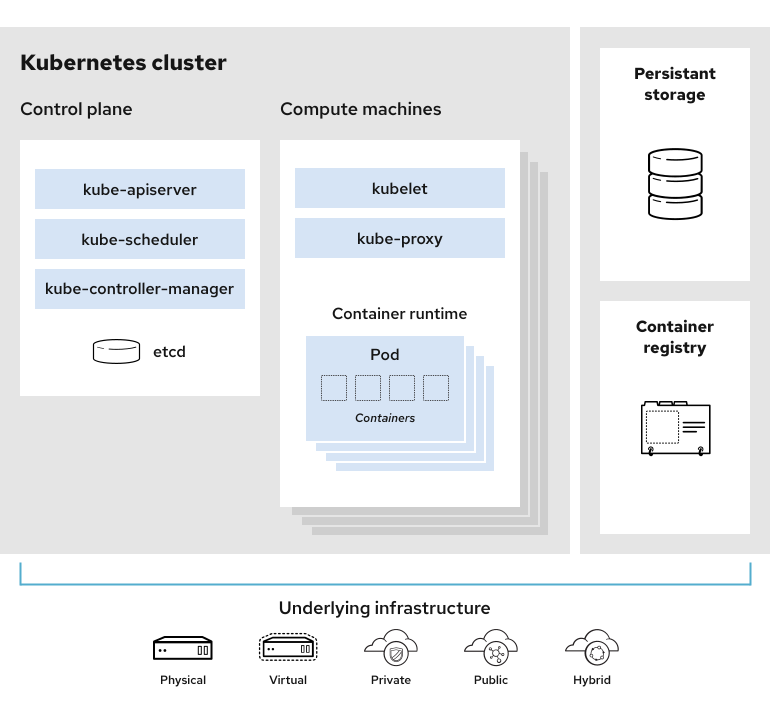
Each worker node has:
- A kubelete, which listens for instructions from the kube-apiserver. It serves to deploy and destroy containers, among other things.
- A kube-proxy, which allows services to talk to other containers on other nodes.
When you want to deploy an application, it runs as a pod on the node. Inside that pod is your container (or sometimes multiple containers). Depending on the size or capacity of your node, you can have many applications running on it. When that one gets maxed out, you can update the cluster to deploy a second worker node, third worker node, etc.
You can interact with the Kubernetes cluster by talking to the API server. The easiest way to do this is to install the kubectl command line tool.
9.1.2 Having a go
You need Docker, minikube and kubectl.
Go to https://minikube.sigs.k8s.io/docs/start/ and follow installation instructions. For me this was:
curl -LO https://github.com/kubernetes/minikube/releases/latest/download/minikube-linux-amd64
sudo install minikube-linux-amd64 /usr/local/bin/minikube && rm minikube-linux-amd64
Go to http://kubernetes.io/docs/tasks/tools/install-kubectl-linux/ and follow instructions.
curl -LO "https://dl.k8s.io/release/$(curl -L -s https://dl.k8s.io/release/stable.txt)/bin/linux/amd64/kubectl"

curl -LO "https://dl.k8s.io/release/$(curl -L -s https://dl.k8s.io/release/stable.txt)/bin/linux/amd64/kubectl.sha256"
echo "$(cat kubectl.sha256)  kubectl" | sha256sum --check

sudo install -o root -g root -m 0755 kubectl /usr/local/bin/kubectl

kubectl version --client
Start a minikube cluster by running:
minikube startI had an issue:
(base) amy@xps:~$ minikube start
😄  minikube v1.37.0 on Ubuntu 24.04
👎  Unable to pick a default driver. Here is what was considered, in preference order:
    ▪ docker: Not healthy: "docker version --format {{.Server.Os}}-{{.Server.Version}}:{{.Server.Platform.Name}}" exit status 1: permission denied while trying to connect to the Docker daemon socket at unix:///var/run/docker.sock: Get "http://%2Fvar%2Frun%2Fdocker.sock/v1.47/version": dial unix /var/run/docker.sock: connect: permission denied
    ▪ docker: Suggestion: Add your user to the 'docker' group: 'sudo usermod -aG docker $USER && newgrp docker' <https://docs.docker.com/engine/install/linux-postinstall/>
💡  Alternatively you could install one of these drivers:
    ▪ kvm2: Not installed: exec: "virsh": executable file not found in $PATH
    ▪ podman: Not installed: exec: "podman": executable file not found in $PATH
    ▪ qemu2: Not installed: exec: "qemu-system-x86_64": executable file not found in $PATH
    ▪ virtualbox: Not installed: unable to find VBoxManage in $PATH

❌  Exiting due to DRV_NOT_HEALTHY: Found driver(s) but none were healthy. See above for suggestions how to fix installed drivers.
I fixed this by adding my user to the docker group so I can interact with Docker without sudo:
sudo usermod -aG docker $USERI then refreshed my shell session:
newgrp dockerWhen re-ran command, this time was a success:
(base) amy@xps:~$ minikube start
😄  minikube v1.37.0 on Ubuntu 24.04
✨  Automatically selected the docker driver. Other choices: none, ssh
📌  Using Docker driver with root privileges
👍  Starting "minikube" primary control-plane node in "minikube" cluster
🚜  Pulling base image v0.0.48 ...
💾  Downloading Kubernetes v1.34.0 preload ...
    > preloaded-images-k8s-v18-v1...:  337.07 MiB / 337.07 MiB  100.00% 43.90 M
    > gcr.io/k8s-minikube/kicbase...:  488.51 MiB / 488.52 MiB  100.00% 68.15 M
🔥  Creating docker container (CPUs=2, Memory=7900MB) ...
❗  Failing to connect to https://registry.k8s.io/ from both inside the minikube container and host machine
💡  To pull new external images, you may need to configure a proxy: https://minikube.sigs.k8s.io/docs/reference/networking/proxy/
🐳  Preparing Kubernetes v1.34.0 on Docker 28.4.0 ...
🔗  Configuring bridge CNI (Container Networking Interface) ...
🔎  Verifying Kubernetes components...
    ▪ Using image gcr.io/k8s-minikube/storage-provisioner:v5
🌟  Enabled addons: storage-provisioner, default-storageclass
🏄  Done! kubectl is now configured to use "minikube" cluster and "default" namespace by default
With minikube, there’s only one node, the master node, you have to do everything on that. We can run this command to see we have one node called minikube and its the control-plane node:
(base) amy@xps:~$ kubectl get nodes
NAME       STATUS   ROLES           AGE   VERSION
minikube   Ready    control-plane   46s   v1.34.0
We can run this command to see what pods are running on the machine. We see all our system pods / services that are running on this control plane… api… controller manager… scheduler… etc.
(base) amy@xps:~$ kubectl get pods -A
NAMESPACE     NAME                               READY   STATUS    RESTARTS      AGE
kube-system   coredns-66bc5c9577-cf2cv           1/1     Running   0             100s
kube-system   etcd-minikube                      1/1     Running   0             106s
kube-system   kube-apiserver-minikube            1/1     Running   0             106s
kube-system   kube-controller-manager-minikube   1/1     Running   0             106s
kube-system   kube-proxy-nzk8v                   1/1     Running   0             101s
kube-system   kube-scheduler-minikube            1/1     Running   0             106s
kube-system   storage-provisioner                1/1     Running   1 (70s ago)   105s
How do we deploy applications onto this cluster? The most basic is called a kubernetes deployment object.
With kubernetes, we can declare in YAML the desired state of our resources, and Kubernetes will work to guarantee that state. We give it the end product, and it will maintain that state at all times until we change it.
There are example deployments at https://kubernetes.io/docs/concepts/workloads/controllers/deployment/. We can see this example:
apiVersion: apps/v1
kind: Deployment
metadata:
  name: nginx-deployment
  labels:
    app: nginx
spec:
  replicas: 3
  selector:
    matchLabels:
      app: nginx
  template:
    metadata:
      labels:
        app: nginx
    spec:
      containers:
      - name: nginx
        image: nginx:1.14.2
        ports:
        - containerPort: 80
There’s a YAML, we’re declaring endstate of deployment. We can see…
apiVersion: apps/v1- all deployment objects have an API versionkind: Deploymentname: nginx-deployment- as we’re going to be deploying some nginx podsreplicas: 3- we want to deploy three pods of this applicationcontainers- within this pod we are going to have a container callednginx, it will pull thenginx:1.14.2image from DockerHub (you would change this to pull from whatever image you have on a container repository), and will useport80.
We create a new file:
sudo nano nginx-deployment.yamlAnd copy in the text above.
To apply this “manifest” to my Kubernetes cluster, I can run:
kubectl apply -f nginx-deployment.yamlNow if we check what pods we have, we see three new pods
kubectl get pods -A
NAMESPACE     NAME                               READY   STATUS    RESTARTS      AGE
default       nginx-deployment-bf744486c-dvz44   1/1     Running   0             70s
default       nginx-deployment-bf744486c-jnhf8   1/1     Running   0             70s
default       nginx-deployment-bf744486c-rfc4l   1/1     Running   0             70s
kube-system   coredns-66bc5c9577-cf2cv           1/1     Running   0             11m
kube-system   etcd-minikube                      1/1     Running   0             11m
kube-system   kube-apiserver-minikube            1/1     Running   0             11m
kube-system   kube-controller-manager-minikube   1/1     Running   0             11m
kube-system   kube-proxy-nzk8v                   1/1     Running   0             11m
kube-system   kube-scheduler-minikube            1/1     Running   0             11m
kube-system   storage-provisioner                1/1     Running   1 (10m ago)   11m
To see the actual deployment object, we run this command, and see there is one deployment, and in that deployment there are three pods:
(base) amy@xps:~$ kubectl get deployments --all-namespaces
NAMESPACE     NAME               READY   UP-TO-DATE   AVAILABLE   AGE
default       nginx-deployment   3/3     3            3           88s
kube-system   coredns            1/1     1            1           11m
To increase to six pods, edit .yaml replicas to 6. As soon as you save the file and run kubectl apply -f nginx-deployment.yaml again, it should update that state to have six pods.
There’s much more you can do. You can run the back-end of your app in a container in a pod, or three pods for higher availability, and then run your front end in a separate container in a different pod or set of pods, and then expose it to a load balancer via a Kubernetes service and have a public IP and a DNS and all of that… you can set network policies and all sorts of configurations according to your preferred architecture and application set-up. Developers commit new features, kicks off Pipeline, new image built, deployed and ran on Kubernetes.
He suggests https://k8slens.dev/ for visualising. It reads the kube config, gives graphical user interface for kubernetes cluster.
He also recommends the course https://www.udemy.com/course/certified-kubernetes-administrator-with-practice-tests. When you sign up for course, you get to use CodeCloud and their simulated Kubernetes to do you work on. Learn new concept, they give terminal, you practice hands-on.
9.2 How does Kubernetes compare with docker?
Docker: Manage individual containers and images. Start and stop containers manually. Focuses on one at a time.
Kubernetes: Used to run lots of containers. It helps you manage them - make sure all are running, restart a new one if one breaks, add more containers when more people use the app (and vice versa), balance the work among your containers.
Kubernetes is “declarative”, so you tell it “I want three containers” and it figures how to achieve that and maintain it (instead of telling it how to do things step-by-step).
It is “dynamic” so it can change the number of boxes on the fly (e.g. in response to user numbers).
Why might you want lots of containers?
- Each container has a limit. If everyone is on one container and it fails, everyone is affected, the whole app goes down. But if you have more than one, the rest keep going, it’s more reliable.
- All your containers can run on one powerful computer (host machine) - but still helpful to have multiple as shares workload and isolates problems. But for large-scale apps or with tools like kubernetes, your containers can also be spread across many different computers (“notes”), so the app keeps working even if one turns off and crashes.
This can be handy for a research project with lots of analysis/scenarios, -
- If need to run lots of experiments at once, can start more containers to deal with surge, then close down.
- It will restart failed jobs.
- It can spread jobs across computers/cloud machines so can run efficiently and avoid overloading servers
- The set-up can be described in a YAML so anyone can run exactly the same cluster on their own machine or cloud, repeatable, reliable. Works anywhere.
- If multiple services talking to each other in workflow, kubernetes can help manage that.